 AIPort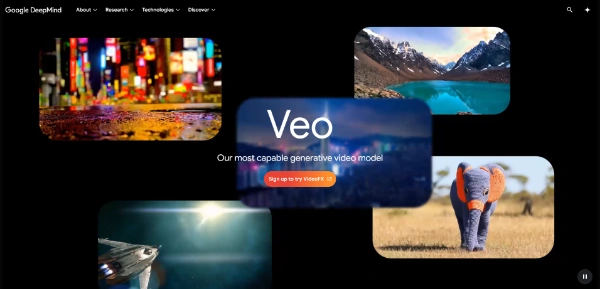

Veo 3.1 by Google: After Using It for a Month, Here's My Honest Take
I've been bouncing between AI video tools for about two years now, and I'll say it upfront: Veo is the first one that made me stop and actually rewind a clip to confirm it wasn't shot with a real camera. Not because it's flawless, because it isn't, but because Google finally cracked something the others have been faking, which is audio that actually belongs to the video.
This is a review of Veo 3.1, the latest version of Google DeepMind's video model. I've been using it through both the Gemini app and Google Flow for a few weeks, and I want to walk through what's actually good, what's frustrating, and whether the pricing makes sense for someone publishing in India. No marketing fluff, no benchmarks copy-pasted from a press release. Just what it's like when you sit down and try to make something with it.
What Veo Actually Is (and Why Version 3.1 Matters)
Veo is Google's flagship AI video generation model, built by the DeepMind team. The current public version is Veo 3.1, which was released in October 2025 and updated again in early 2026 with a cheaper Lite variant. You can access it three different ways: through the consumer Gemini app, through Google Flow which is their filmmaking interface, or through the Gemini API and Vertex AI if you're a developer building something on top of it.
Veo 3 was the big leap. That's when Google added native audio generation, which honestly nobody else had nailed at the time. Veo 3.1 builds on that with better prompt adherence, better character consistency across shots, and a stack of editing controls that were previously the territory of dedicated VFX software. The model also leads several public benchmarks. On the MovieGenBench dataset that Meta released, Veo 3.1 won out on overall preference, text alignment, and visual quality when human raters compared it against the field. That's not me saying it. That's what the actual study data shows.
If you want to dig into the technical bits, the official model page on deepmind.google/models/veo has the full breakdown including the model card and tech report.
The Audio Thing Changes Everything
Here's what I mean about audio. You write a prompt like, "old fisherman on a boat in heavy rain mutters about the catch being bad this year," and Veo doesn't just animate it. The rain has actual rain sound. The boat creaks. The fisherman speaks in a voice that fits his face. The lip sync isn't perfect every time, but it's close enough that you'd accept it on a vertical short without anyone calling you out.
Every other major model right now still requires a separate audio pipeline. You generate the video, then you find a voice model, then you find ambient sound, then you mix it in DaVinci or CapCut. With Veo 3.1, that whole chain collapses into one prompt. The time savings on social content are huge. I went from a 40-minute workflow per reel down to something like 8 minutes, and most of those 8 minutes were just waiting for the generation to finish.
That said, the audio quality isn't broadcast-grade. It's good enough for Reels, Shorts, and short-form ad work. For something that needs to play in a cinema or on a real campaign, you'd still want a proper sound designer touching it up. But for the 99 percent of creators making content for phones, this is enough.
What's Inside Veo 3.1: The Features That Actually Get Used
Google has stuffed a lot into Veo. Some of it is genuinely useful. Some of it is marketing fluff that you'll never touch. Let me separate the two from actual use.
Ingredients to Video
This is the standout. You feed in reference images, things like a scene, a character, or an object, and Veo uses them to guide the generation while keeping your text prompt as the director. It's how you stop the model from inventing a brand new face every time you generate the same character. For anyone making short series content with recurring characters, this is the feature.
Match Style
You give Veo a reference image of an aesthetic, like a painting or a specific cinematic look, and it generates a video in that visual language. Useful for branded content where you need consistency across episodes.
Scene Extension
Lets you take the last second of one clip and continue from there, both visually and audibly. So you can stitch together longer narratives without the jarring cut that AI video usually forces on you.
Camera Controls
Move back, zoom in, push up, pan right, all controlled with specific inputs rather than vague prompts. This one feels like Google watched filmmakers complain about prompt-based camera work for two years and decided to just give us proper controls.
First and Last Frame
Give Veo two images, the first and last frame of your shot, and it fills in everything between. Useful for transitions and for getting predictable outcomes.
Outpainting, Add Object, Remove Object
The video editing trio. Outpainting expands beyond the original frame for different aspect ratios. Add Object lets you drop new elements into existing footage, and the model handles shadows and scale automatically. Remove Object does what it sounds like, cleanly.
Character Controls
You can use your own body, face, and voice to drive a character's movement. It's gimmicky for most people but legitimately powerful for animators doing performance capture without a studio.
Resolution
1080p and 4K outputs are both supported on the highest tier. 1080p is the sweet spot for social. 4K is where Veo starts to flex against Sora and Runway, especially for client work that gets viewed on a big screen.
Pricing: Where It Gets Complicated
Google has done what Google always does, which is to make pricing confusing. There are basically four ways to pay for Veo, and the right one depends entirely on how much video you're making.
The Free Route
The free Gemini plan gives you 100 monthly AI credits that you can spend on video generation in Flow and Whisk. The catch is that on the free tier, you don't get full Veo 3.1, you get limited Veo 3 access. It's enough to test the platform but not enough to publish anything serious.
Google AI Plus
This is the entry paid tier at around $7.99 per month. It gives you Veo 3.1 Fast access, which is the cheaper and faster (but slightly lower quality) version of the model. Good for hobbyists who want to make a clip or two a week.
Google AI Pro
$19.99 per month internationally, and in India it's priced at Rs 1,950 per month. This is the most common tier for serious creators. You get 1,000 monthly credits, full Veo 3.1 Fast access in Flow and the Gemini app, plus a limited Veo 3.1 Lite trial. A typical 10-second Veo 3.1 video uses around 125 credits, which means roughly 50 Veo 3.1 Fast videos a month on this plan. That sounds like a lot, but if you're iterating heavily on prompts (and you will be), the math gets tight fast.
Google AI Ultra
$249.99 per month. This is the production tier with 25,000 monthly credits, full Veo 3.1 access (not just Fast), and priority on generation queues. Aimed at agencies, studios, and creators who genuinely run video at scale. Most individuals don't need this.
The API Route
If you're a developer, the Gemini API gives you direct access. Veo 3.1 Fast runs around $0.15 per second, Veo 3.1 Standard runs around $0.40 per second, and the cost-optimized Veo 3.1 Lite (launched March 31, 2026 on Vertex AI) is approximately $0.05 per second. Audio generation is included in those rates. New Google Cloud accounts come with $300 in free credits, which on Veo 3.1 Lite translates to roughly 100 minutes of generated video. Not bad for a free trial.
One thing worth flagging: API pricing changes more often than the subscription tiers. Always confirm current rates on the official Gemini API pricing page before you build anything around the cost.
Veo from India: What Works, What Doesn't
Veo 3 launched in India in July 2025 on the Pro tier, and Veo 3.1 has been accessible here since the global rollout. You don't need a VPN. You don't need any workarounds. You just sign up for Google AI Pro at Rs 1,950 per month and you're in.
What's not great: there's no India-specific pricing tier with rupee billing for credits if you outgrow Pro. Once you hit the Ultra tier, you're paying USD with all the forex markup your card issuer adds on. For most Indian creators, that's a hard stop. Either stay on Pro and iterate carefully, or move to API access with Vertex AI which can sometimes be cheaper per video depending on your usage pattern.
Hindi prompting works reasonably well, especially for narration. Devanagari script in prompts can be hit or miss depending on the model variant, so I've found Roman-script Hinglish gives more reliable results. If you're explicitly going for Hindi dialogue, write your dialogue lines in Roman script ("Yeh ek nayi shuruaat hai") and you'll get cleaner audio output. This was the same trick that worked on earlier Google models too.
Honest Strengths
Native audio is the single biggest win. Nothing else in this market generates synchronized dialogue, ambient sound, and sound effects in one pass. That alone justifies Veo's price for anyone making short-form social content.
The physics and realism are genuinely impressive. Water behaves like water, fabric moves like fabric, and lighting respects scene geometry. This is something Veo's competitors talk about but Veo actually delivers on.
Prompt adherence has improved sharply in version 3.1. If you write a detailed cinematic prompt, the model executes on most of it. Earlier versions would ignore key instructions. Now they mostly land.
The Flow interface is the best AI filmmaking environment I've used. It's clearly built by people who understand actual production workflows, not just AI demos. Camera controls, scene extension, and ingredient management all live in one place without you needing to bounce between tools.
Integration is everywhere. Through Gemini, through Workspace via Vids, through API, through partner platforms. Even Luma's Dream Machine offers Veo 3 access as a third-party model. Google has made sure you'll bump into Veo no matter which AI platform you start with.
Honest Weaknesses
Clip length is the most annoying limitation. Most generations cap at 8 seconds. You can extend, but every extension is another credit hit and another roll of the dice for visual consistency. Stitching a 30-second piece together is doable but not effortless.
The credit system burns fast on iteration. AI video is iterative by nature, you'll regenerate the same prompt four or five times to get one usable clip. On the Pro plan with 1,000 credits per month, that translates to roughly 10 to 15 truly polished outputs a month if you're being honest about how often you nail it on the first try.
Strict content filters can be frustrating. Veo blocks prompts that other models will happily generate, including some surprisingly mild creative scenarios. Google's safety stance is more conservative than Luma's or Runway's, which is fine for brand-safe work but irritating for creative experimentation.
SynthID watermarking is embedded in every generation. You can't turn it off. It's invisible to the eye but detectable by Google's verification tools. For 99 percent of creators this doesn't matter, but if you're using AI video as part of a service you're selling, the watermark is part of the deal.
And the regional pricing gap stings if you're outside the US. Indian creators in particular are paying nearly the same dollar amount as American ones for what is, frankly, a service that doesn't have rupee-tier features. That's a Google-wide problem, not just a Veo problem, but it's still real.
How It Compares to Sora 2, Runway, and Luma Ray3
Quick honest take on the four big players in 2026.
Veo 3.1 vs Sora 2. Sora 2 has slightly longer default clips and is sometimes preferred for surreal or stylized content. Veo wins on physics realism and on the audio side, since Sora still doesn't ship native audio generation at the same level. For most creators, Veo is the safer pick.
Veo 3.1 vs Runway Gen-3. Runway has a stronger editing suite wrapped around its generation model. If you want the full editor experience, Runway is more polished. If you want the best output quality and don't mind editing elsewhere, Veo wins. For tools that bridge both worlds, check our guide to AI video creation tools.
Veo 3.1 vs Luma Ray3. Ray3 has the edge on pure cinematic quality and HDR work, especially after the Ray3.14 update. Veo has the edge on audio and on overall ecosystem integration with Google's other products. If you're already in the Google ecosystem, Veo is the natural choice. If you're building a high-end cinematic pipeline, Ray3 is hard to beat.
You can also explore Lumiere AI by Google in our directory if you're curious about other Google research video models. For the full landscape, browse our Video Generators category on AIPort.
Who Should Actually Pay for This
Short-form social creators producing Reels, Shorts, and TikToks. The native audio alone saves you hours per video. The Pro plan at Rs 1,950 a month is genuinely a good deal for this audience.
Brand and ad teams who need consistent characters across multiple shots. Ingredients to Video is the feature that makes this possible without the painful character drift that older models forced you to deal with.
Indie filmmakers exploring previz or proof of concept work. Veo 3.1 in Flow is now genuinely usable for pitching ideas before you spend real money on production.
YouTubers creating B-roll, intros, transitions, or thumbnails. Even on Pro tier credits, you can produce a meaningful amount of supplemental content per month.
Who shouldn't pay? Casual users who'll generate maybe one or two videos a month. For that, the free tier is enough. Also, anyone whose work depends on edgier creative themes that Google's safety filters will reject. You'll be happier on Runway or Luma.
How to Get Started Without Wasting Money
- Start with the free Gemini tier. Generate a few clips. Understand the model's strengths and limitations before paying.
- If you stay engaged for a week and want more, jump to Google AI Pro at Rs 1,950 per month (or $19.99 international). This is the realistic working tier.
- Learn prompting. Cinematic language matters. Write camera moves explicitly ("slow dolly in from medium shot to close-up"), describe lighting ("golden hour, soft backlight, lens flare"), and specify mood. Vague prompts waste credits.
- Use Ingredients to Video for any project with recurring characters. It's the single biggest feature for narrative work.
- Generate in Draft mode first when you're iterating. Save full-quality generations for prompts you're confident about.
- If you go beyond 50 to 100 videos a month, look at API access through Vertex AI. The per-second pricing can be cheaper than subscription credits at high volumes.
For more curated tools to round out your AI workflow, browse the full AI tools directory, or check the Text-to-Video category for alternatives.
Key Takeaways
- Veo 3.1 is the strongest AI video model in 2026 for creators who need synchronized audio in a single generation.
- Native audio, physics realism, and Flow's interface are the main reasons to choose Veo over competitors.
- Pricing ranges from a limited free tier to $249.99 per month for Ultra. Google AI Pro at $19.99 (or Rs 1,950 in India) is the practical working tier.
- API access through Gemini and Vertex AI starts at roughly $0.05 per second on the Lite variant, which can beat subscription pricing at high volumes.
- The 8-second clip limit, conservative content filters, and credit burn on iteration are the main pain points.
- Available in India without VPN since July 2025. Hindi prompting works best in Roman script for cleaner audio.
- Best for short-form creators, brand teams, indie filmmakers, and YouTubers. Less useful for casual users or those who push creative boundaries that filters reject.
Frequently Asked Questions
Is Veo 3.1 free to use?
The free Gemini plan includes 100 monthly AI credits, but you only get limited access to older Veo 3, not the full Veo 3.1. To get the latest model with native audio and full quality, you need Google AI Pro at $19.99 per month (Rs 1,950 in India) or higher.
Can I use Veo 3.1 in India?
Yes. Veo has been available in India since July 2025 through Google AI Pro at Rs 1,950 per month. You access it via the Gemini app, Google Flow, or the Gemini API. No VPN required.
What is the difference between Veo 3.1 Fast and Veo 3.1 Standard?
Veo 3.1 Fast is the speed and cost optimized variant, priced at around $0.15 per second on the API. It's quicker and cheaper but slightly lower quality. Standard is the full quality version at around $0.40 per second. Both include native audio generation.
Can Veo 3.1 generate Hindi dialogue?
Yes, but the results are most reliable when you write the dialogue in Roman script (for example, "Yeh kahani sachchi hai") rather than Devanagari. The model handles natural speech in many languages including Hindi, though English remains the strongest.
Final Verdict
Veo 3.1 is the AI video model I reach for first in 2026. Not because it's perfect, but because it's the one that solves the most problems in a single tool. The native audio alone has cut my production time in half. The Flow interface is the best creative environment in this space. And the integration with the rest of Google's ecosystem means I'm never bouncing between five tabs to get one clip out.
The negatives are real. Credit burn, conservative filters, regional pricing gaps. But none of them are dealbreakers for the audience this tool is actually built for, which is creators making short-form content at scale.
If you're already paying for any AI video tool in 2026, you should be testing Veo 3.1 against it. There's a real chance you'll switch. And if you're still on the fence about AI video as a category, start with the free Gemini tier, make a few clips, and decide for yourself whether the audio thing changes your workflow as much as it changed mine.
For more tool comparisons and reviews, explore the AI Video Generators directory on AIPort, or our 2026 best AI tools guide.


